Monday, March 12, 2012

fonts problem in jasper report for pdf

when we export jaspert report to pdf format, we face problem with the font of the file. As, jasper report deal with its own true type font only for pdf. For this reason, we need to use the steps of font extension. This can be done following the steps below:

Ingredients: Jar file of jasperreports-fonts-v.v.v.(v stand for Version), true type fonts

1. Download the jasperreports-fonts-v.v.v(i.e jasperreports-fonts-4.0.1) jar file to modify according your requirements.
2.Right click on the jar file and select Extract to jasperreports-fonts-v.v.v.
3.At the root directory of the extracted folder, there is a properties file named: jasperreports_extension.properties

The file contains:
net.sf.jasperreports.extension.registry.factory.simple.font.families=net.sf.jasperreports.engine.fonts.SimpleFontExtensionsRegistryFactory
net.sf.jasperreports.extension.simple.font.families.dejavu=net/sf/jasperreports/fonts/fonts.xml

For the practise, here we will try to add the Times New Roman fonts to this jar. So, now we will have to add the following lines at the above file.
net.sf.jasperreports.extension.simple.font.families.timesnewroman=net/sf/jasperreports/fonts/fonts.xml

After adding we will get the file as:

net.sf.jasperreports.extension.registry.factory.simple.font.families=net.sf.jasperreports.engine.fonts.SimpleFontExtensionsRegistryFactory
net.sf.jasperreports.extension.simple.font.families.dejavu=net/sf/jasperreports/fonts/fonts.xml
net.sf.jasperreports.extension.simple.font.families.timesnewroman=net/sf/jasperreports/fonts/fonts.xml

4.Now, create the specific location to save the font collection. for this purpose, we create a directory in the location of ~/jasperreports-fonts-v.v.v\net\sf\jasperreports\fonts\. The name of the file will be timesnewroman for our case.

5. Now we need to add the collections of true type fonts at the above newly created location. Generally four files will be added as the representative of four categories: normal, bold, italic, bold italic.

6. Now its the time to modifying the fonts.xml file. We need to add the definition of the font to tis xml file. For our case, the definition will be as:

<fontFamily name="Times New Roman">
<normal>net/sf/jasperreports/fonts/timesnewroman/times.ttf</normal>
<bold>net/sf/jasperreports/fonts/timesnewroman/timesbd.ttf</bold>
<italic>net/sf/jasperreports/fonts/timesnewroman/timesi.ttf</italic>
<boldItalic>net/sf/jasperreports/fonts/timesnewroman/timesbi.ttf</boldItalic>
<pdfEncoding>Identity-H</pdfEncoding>
<pdfEmbedded>true</pdfEmbedded>
<exportFonts>
<export key="net.sf.jasperreports.html">'Times New Roman', Arial, Helvetica, sans-serif</export>
<export key="net.sf.jasperreports.xhtml">'Times New Roman', Arial, Helvetica, sans-serif</export>
</exportFonts>
<!--
<locales>
<locale>en_US</locale>
<locale>de_DE</locale>
</locales>
-->
</fontFamily>

7. after completion of customization, again we will make the jar from the raw files. Entering into the extracted folder, select all the files. right clcik and select the option Add to Archive. select the type to ZIP. At the end of the name, change the extension to .jar.

8. After that use this jar where you want.


--
For converting code to show on blog, i have used http://centricle.com/tools/html-entities/

Thursday, February 23, 2012

Setting Maximum no. of characters in jTextField for Swing Application

Sometimes we need to fixed the maximum size of a text field. For this purpose, we need to implement a document containing an overriding function of plain document.

public class MaxLengthTextDocument extends PlainDocument {

private int maxChars;

@Override
public void insertString(int offs, String str, AttributeSet a)
throws BadLocationException {
if(str != null && (getLength() + str.length() < getMaxChars())){ super.insertString(offs, str, a); } } /** * @return the maxChars */ public int getMaxChars() { return maxChars; } /** * @param maxChars the maxChars to set */ public void setMaxChars(int maxChars) { this.maxChars = maxChars; } }


after that we will have to set the following line after initComponents() of view file.


MaxLengthTextDocument maxLength = new MaxLengthTextDocument();
maxLength.setMaxChars(12);//50 is a maximum number of character
this.txtMobileNo.setDocument(maxLength);

Wednesday, February 22, 2012

Executing a JAR file using Windows Task Scheduler

Generally, when we click over a jar file , it executes. But if we are in need of executing a jar file using Windows Scheduler it invites some barriers(!).
We are not in need to do something incredible, just usingthe Windows Task Scheduler. . We need to customize the various prefrences for setting up the task in the windows scheduler.

Since a JAR file is not a Windows executable file, all you need to do is:

1. Type task in the run from the start menu(for windows 7).
2. from the action panel of the right side of the window, select Create task.
3. Filling all the parameters of General and Trigger panel, from the action panel
Set program or script to the location of java.exe from the specified location of the jre folder.
C:\Program Files\Java\jre6\bin\java.exe
Set add arguments option to something like the command line to execute the jar.
-jar D:\jarFileLocation\jarFile.jar


Thursday, February 2, 2012

MSDTC on server 'servername' is unavailable

MSDTC on server 'servername' is unavailable

By default, when a stand-alone instance of Microsoft SQL Server exists in a cluster environment, the SQL Server-based instance is set to start automatically. If the host node is rebooted, you may receive the following error message when you issue commands that are related to distributed transactions:

RESOLUTION
On the server where the trigger resides, you need to turn the MSDTC service on. You can this by clicking START > SETTINGS > CONTROL PANEL > ADMINISTRATIVE TOOLS > SERVICES. Find the service called 'Distributed Transaction Coordinator' and RIGHT CLICK (on it and select) > Start.

Friday, January 27, 2012

Rich Snippets to improve the display of search results

all most all the Internet user use the search engine to find out the link he/she needs so its an important issue to present a website attractively fro the first glance at the search results pages.
a web developer may control the view of a web page in the search results. If its not controlled by the web developer, then search engines use the default mechanism to show the info about the web page.
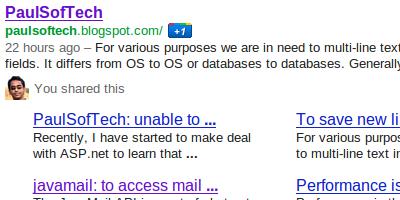
One of the mechanisms is Rich Snippets to present a website information in the search result.

The above screen shot is of a search result of a blog powered by blogger.com. Here the rich snippets is used by the blogger.
As the same way we are able to use rich snippets for our web site. Its nothing more than adding the tag to make it sensible to a search engine about the content of the site page to show on the search results.


An important link to a testing tools for Rich snippets of google web master.With rich snippets, webmasters with sites containing structured content such as review sites or business listings—can label their content to make it clear that each labeled piece of text represents a certain type of data: for example, a restaurant name, an address, or a rating.

This kind of markup is designed for sites containing specific types of structured data. Google currently supports the following information types: reviews, people profiles, products, business listings, recipes, and events.
Providing this information doesn't affect the appearance of your content on your own pages, but it does help Google better understand and present information from your page.

The properties supported by Google are based on a number of different formats. For more information, see the following articles:

* About microdata
* About microformats
* About RDFa

MicroData:

# information(specific type item)
# properties related to the item.
#Microdata uses simple html(i.e span, div) tags to assign brief and descriptive names to items and properties.

Exmaple of Microdata html marked up:
<div itemscope itemtype="http://data-vocabulary.org/Person">
My name is <span itemprop="name">Bob Smith</span>
but people call me <span itemprop="nickname">Smithy</span>.
Here is my home page:
<a href="http://www.example.com" itemprop="url">www.example.com</a>
I live in Albuquerque, NM and work as an <span itemprop="title">engineer</span>
at <span itemprop="affiliation">ACME Corp</span>.
</div>


Microformat:

Microformats are simple conventions (known as entities) used on web pages to describe a specific type of information —for example, a review, an event, a product, a business, or a person. Each entity has its own properties. For example, a Person has the properties name, address, job title, company, and email address.

In general, microformats use the class attribute in HTML tags (often span or div) to assign brief and descriptive names to entities and their properties. Here's an example of a short HTML with micro format showing basic contact information for Bob Smith.

<div class="vcard">
<img class="photo" src="www.example.com/bobsmith.jpg" />
<strong class="fn">Bob Smith</strong>
<span class="title">Senior editor</span> at <span class="org">ACME Reviews</span>
<span class="adr">
<span class="street-address">200 Main St</span>
<span class="locality">Desertville</span>, <span class="region">AZ</span>
<span class="postal-code">12345</span>
</span>
</div>

RDF
RDFa is a way to label content to describe a specific type of information, such as a restaurant review, an event, a person, or a product listing. These information types are called entities or items. Each entity has a number of properties. For example, a Person has the properties name, address, job title, company, and email address.

In general, RDFa uses simple attributes in XHTML tags (often span or div) to assign brief and descriptive names to entities and properties. Here's an example of a short HTML with RDF showing basic contact information for Bob Smith.

<div xmlns:v="http://rdf.data-vocabulary.org/#" typeof="v:Person">
My name is <span property="v:name">Bob Smith</span>,
but people call me <span property="v:nickname">Smithy</span>.
Here is my homepage:
<a href="http://www.example.com" rel="v:url">www.example.com</a>.
I live in Albuquerque, NM and work as an <span property="v:title">engineer</span>
at <span property="v:affiliation">ACME Corp</span>.
</div>


--
A shared markup vocabulary makes easier for webmasters to decide on a markup schema and get the maximum benefit for their efforts.So, in the spirit of sitemaps.org, search engines have come together to provide a shared collection of schemas that webmasters can use.


We can use the schema.org vocabulary, along with the microdata format, to add information to your HTML content. While the long term goal is to support a wider range of formats, the initial focus is on Microdata. This guide will help get us up to speed with microdata and schema.org, so that we can start adding markup to our web pages.