
Showing posts with label Web Engineering. Show all posts
Showing posts with label Web Engineering. Show all posts
Sunday, September 14, 2014


Monday, February 4, 2013
MVC in Sturts 2 and the flow of execution.
At first check MVC funda
Suppose we want to create a application to show greetings for an interaction in by user. For this purpose, we can provide a page for initial interaction by the user. Suppose this page is index.jsp. This page contains a link by clicking which the user is able to get greetings from application. to so so we need to make following arrangements:

Suppose we want to create a application to show greetings for an interaction in by user. For this purpose, we can provide a page for initial interaction by the user. Suppose this page is index.jsp. This page contains a link by clicking which the user is able to get greetings from application. to so so we need to make following arrangements:
- Create a class to store the welcome message (the model)
- Create a server page to present the message (the view)
- Create an Action class to control the interaction between the user, the model, and the view (the controller)
- Create a mapping (struts.xml) to couple the Action class and view

How the code works here:
A browser sends to the web server a request for the URL
- User send request by clicking on the link and in the link it is depicted which action will be implemented.
- The container receives from the web server a request for the depicted resource grettings.action. According to the settings loaded from the web.xml, the container finds that all requests are being routed to org.apache.struts2.dispatcher.ng.filter.StrutsPrepareAndExecuteFilter, including the *.action requests. The StrutsPrepareAndExecuteFilter is the entry point into the framework.
- The framework looks for an action mapping named (i.e)"greetings", and it finds that this mapping corresponds to the class . The framework instantiates the Action and calls the Action's required method.
- The method creates the GreetingProvider (model) object and returns SUCCESS(feedback strings). The framework checks the action mapping to see what page to load if SUCCESS is returned. The framework tells the container to render as the response to the request, the resource welcome.jsp.
- As the page welcome.jsp is being processed, and the tag merges into the response the value of the required attributes.
- A pure HTML response is sent back to the browser.
Friday, January 27, 2012
Rich Snippets to improve the display of search results
all most all the Internet user use the search engine to find out the link he/she needs so its an important issue to present a website attractively fro the first glance at the search results pages.
a web developer may control the view of a web page in the search results. If its not controlled by the web developer, then search engines use the default mechanism to show the info about the web page.
One of the mechanisms is Rich Snippets to present a website information in the search result.
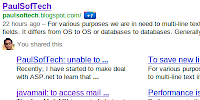
The above screen shot is of a search result of a blog powered by blogger.com. Here the rich snippets is used by the blogger.
As the same way we are able to use rich snippets for our web site. Its nothing more than adding the tag to make it sensible to a search engine about the content of the site page to show on the search results.
An important link to a testing tools for Rich snippets of google web master.With rich snippets, webmasters with sites containing structured content such as review sites or business listings—can label their content to make it clear that each labeled piece of text represents a certain type of data: for example, a restaurant name, an address, or a rating.
This kind of markup is designed for sites containing specific types of structured data. Google currently supports the following information types: reviews, people profiles, products, business listings, recipes, and events.
Providing this information doesn't affect the appearance of your content on your own pages, but it does help Google better understand and present information from your page.
The properties supported by Google are based on a number of different formats. For more information, see the following articles:
* About microdata
* About microformats
* About RDFa
MicroData:
# information(specific type item)
# properties related to the item.
#Microdata uses simple html(i.e span, div) tags to assign brief and descriptive names to items and properties.
Microformat:
Microformats are simple conventions (known as entities) used on web pages to describe a specific type of information —for example, a review, an event, a product, a business, or a person. Each entity has its own properties. For example, a Person has the properties name, address, job title, company, and email address.
In general, microformats use the class attribute in HTML tags (often span or div) to assign brief and descriptive names to entities and their properties. Here's an example of a short HTML with micro format showing basic contact information for Bob Smith.
RDF
RDFa is a way to label content to describe a specific type of information, such as a restaurant review, an event, a person, or a product listing. These information types are called entities or items. Each entity has a number of properties. For example, a Person has the properties name, address, job title, company, and email address.
In general, RDFa uses simple attributes in XHTML tags (often span or div) to assign brief and descriptive names to entities and properties. Here's an example of a short HTML with RDF showing basic contact information for Bob Smith.
--
A shared markup vocabulary makes easier for webmasters to decide on a markup schema and get the maximum benefit for their efforts.So, in the spirit of sitemaps.org, search engines have come together to provide a shared collection of schemas that webmasters can use.
We can use the schema.org vocabulary, along with the microdata format, to add information to your HTML content. While the long term goal is to support a wider range of formats, the initial focus is on Microdata. This guide will help get us up to speed with microdata and schema.org, so that we can start adding markup to our web pages.
a web developer may control the view of a web page in the search results. If its not controlled by the web developer, then search engines use the default mechanism to show the info about the web page.
One of the mechanisms is Rich Snippets to present a website information in the search result.
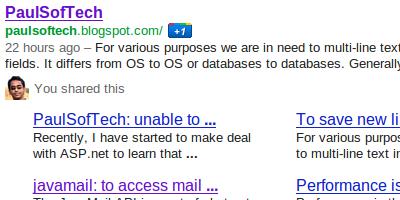
The above screen shot is of a search result of a blog powered by blogger.com. Here the rich snippets is used by the blogger.
As the same way we are able to use rich snippets for our web site. Its nothing more than adding the tag to make it sensible to a search engine about the content of the site page to show on the search results.
An important link to a testing tools for Rich snippets of google web master.With rich snippets, webmasters with sites containing structured content such as review sites or business listings—can label their content to make it clear that each labeled piece of text represents a certain type of data: for example, a restaurant name, an address, or a rating.
This kind of markup is designed for sites containing specific types of structured data. Google currently supports the following information types: reviews, people profiles, products, business listings, recipes, and events.
Providing this information doesn't affect the appearance of your content on your own pages, but it does help Google better understand and present information from your page.
The properties supported by Google are based on a number of different formats. For more information, see the following articles:
* About microdata
* About microformats
* About RDFa
MicroData:
# information(specific type item)
# properties related to the item.
#Microdata uses simple html(i.e span, div) tags to assign brief and descriptive names to items and properties.
Exmaple of Microdata html marked up:
<div itemscope itemtype="http://data-vocabulary.org/Person">
My name is <span itemprop="name">Bob Smith</span>
but people call me <span itemprop="nickname">Smithy</span>.
Here is my home page:
<a href="http://www.example.com" itemprop="url">www.example.com</a>
I live in Albuquerque, NM and work as an <span itemprop="title">engineer</span>
at <span itemprop="affiliation">ACME Corp</span>.
</div>
<div itemscope itemtype="http://data-vocabulary.org/Person">
My name is <span itemprop="name">Bob Smith</span>
but people call me <span itemprop="nickname">Smithy</span>.
Here is my home page:
<a href="http://www.example.com" itemprop="url">www.example.com</a>
I live in Albuquerque, NM and work as an <span itemprop="title">engineer</span>
at <span itemprop="affiliation">ACME Corp</span>.
</div>
Microformat:
Microformats are simple conventions (known as entities) used on web pages to describe a specific type of information —for example, a review, an event, a product, a business, or a person. Each entity has its own properties. For example, a Person has the properties name, address, job title, company, and email address.
In general, microformats use the class attribute in HTML tags (often span or div) to assign brief and descriptive names to entities and their properties. Here's an example of a short HTML with micro format showing basic contact information for Bob Smith.
<div class="vcard">
<img class="photo" src="www.example.com/bobsmith.jpg" />
<strong class="fn">Bob Smith</strong>
<span class="title">Senior editor</span> at <span class="org">ACME Reviews</span>
<span class="adr">
<span class="street-address">200 Main St</span>
<span class="locality">Desertville</span>, <span class="region">AZ</span>
<span class="postal-code">12345</span>
</span>
</div>
<img class="photo" src="www.example.com/bobsmith.jpg" />
<strong class="fn">Bob Smith</strong>
<span class="title">Senior editor</span> at <span class="org">ACME Reviews</span>
<span class="adr">
<span class="street-address">200 Main St</span>
<span class="locality">Desertville</span>, <span class="region">AZ</span>
<span class="postal-code">12345</span>
</span>
</div>
RDF
RDFa is a way to label content to describe a specific type of information, such as a restaurant review, an event, a person, or a product listing. These information types are called entities or items. Each entity has a number of properties. For example, a Person has the properties name, address, job title, company, and email address.
In general, RDFa uses simple attributes in XHTML tags (often span or div) to assign brief and descriptive names to entities and properties. Here's an example of a short HTML with RDF showing basic contact information for Bob Smith.
<div xmlns:v="http://rdf.data-vocabulary.org/#" typeof="v:Person">
My name is <span property="v:name">Bob Smith</span>,
but people call me <span property="v:nickname">Smithy</span>.
Here is my homepage:
<a href="http://www.example.com" rel="v:url">www.example.com</a>.
I live in Albuquerque, NM and work as an <span property="v:title">engineer</span>
at <span property="v:affiliation">ACME Corp</span>.
</div>
My name is <span property="v:name">Bob Smith</span>,
but people call me <span property="v:nickname">Smithy</span>.
Here is my homepage:
<a href="http://www.example.com" rel="v:url">www.example.com</a>.
I live in Albuquerque, NM and work as an <span property="v:title">engineer</span>
at <span property="v:affiliation">ACME Corp</span>.
</div>
--
A shared markup vocabulary makes easier for webmasters to decide on a markup schema and get the maximum benefit for their efforts.So, in the spirit of sitemaps.org, search engines have come together to provide a shared collection of schemas that webmasters can use.
We can use the schema.org vocabulary, along with the microdata format, to add information to your HTML content. While the long term goal is to support a wider range of formats, the initial focus is on Microdata. This guide will help get us up to speed with microdata and schema.org, so that we can start adding markup to our web pages.
Subscribe to:
Posts (Atom)